Record the work, review it together, and decide what to change. ChoreTracking compares recorded minutes; your household decides what feels fair.
How does ChoreTracking calculate the household balance?
For the selected period, ChoreTracking adds each person's recorded minutes. A person's share is their logged minutes divided by the household's total logged minutes, multiplied by 100. The minute difference compares those time totals. This is a record of self-reported time, not points, money or an objective fairness score. With no logged time, there is no workload share to compare.
1. Add the people whose work you want to record
In free local mode, add up to three person labels on one device. Labels identify whose work an entry describes; they are not separate account logins. A paid household lets each member sign in on their own device.
2. Log a task by voice, preset or text
For example, say “Alex cooked dinner for 45 minutes and Sam planned meals for 15 minutes.” Voice entries are transcribed and parsed into drafts. Review the person, category, task and minutes before saving. You can also enter a task directly or choose a quick preset.
Include planning, appointments, remembering and coordination as Mental Load entries when you choose to record that time. The app does not detect unrecorded work automatically.
ChoreTracking does not automatically assign or rotate chores or send chore reminders. Agree on responsibilities together; use the app to record what each person says they did.
3. Read the balance: a fictional household example
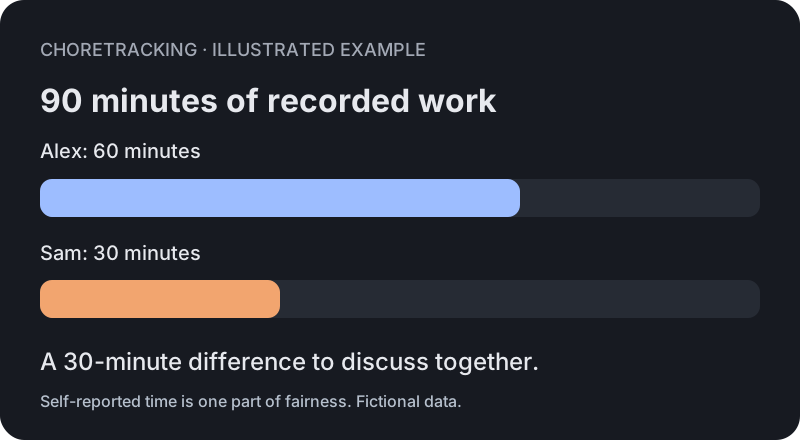
The following illustration uses fictional names and tasks. It is not a customer screenshot or a claim about typical results.
| Person | Task | Category | Minutes |
|---|---|---|---|
| Alex | Cook dinner | Cooking | 45 |
| Alex | Book dentist | Mental Load | 15 |
| Sam | Bedtime | Kids | 30 |
For this period, Alex has 60 recorded minutes and Sam has 30. The total is 90 minutes, so their shares are approximately 67% and 33%, with a 30-minute difference. The app groups entries by person and category and filters them for Today, 7 days, 30 days or All.
4. Discuss the context, not just the number
Minutes do not measure task intensity, disability, paid-work schedules, emotional care, care quality or responsibilities nobody recorded. Equal minutes are not automatically fair. Use the record as one input to a conversation, agree on category ownership, and review the arrangement when circumstances change.
On one device or across a household
Free local mode keeps work records in that browser. Back up useful records with CSV export: clearing browser storage or changing devices can lose local records. Couple and Group add cloud sync and separate logins. Install the progressive web app from your browser; there is no app-store download.
Deciding whether to switch from a shared sheet? See the ChoreTracking and spreadsheet comparison, including customization, logging, costs and limitations.
What happens to voice recordings?
Voice transcription needs the network. Audio passes through our servers to an OpenAI transcription model, and we do not store it after the request completes. Recordings stop at 60 seconds. Review the Privacy Policy for providers, operational metadata and retention.
Exporting, deleting and canceling
Export work logs as CSV from You. Signed-in users can export account and household data as JSON, request account deletion, and manage an owner’s subscription through Stripe. Deletion has a 7-day cooling-off period; shared data needed by remaining members may remain. Canceling a subscription keeps access through the end of its billing period. See the Terms and Privacy Policy for details.